

VerCab Corporate
Mobility yourorganisation cansee and settle.
Employee and executive travel, managed end to end by VerCab and run on our own operations platform. Centralised booking, your travel policy, approvals, live visibility and one consolidated invoice.
What VerCab solves
The parts of corporate travel nobody owns.
Ground transport tends to sit between HR, admin, finance and whoever booked the cab last. These are the gaps that creates.
- Bookings scattered everywhere
- Requests arrive by email, message and phone, held by whoever happened to take them. Nothing is one list.
- Policy applied afterwards
- Vehicle class and spend get questioned at invoice time, when the journey has already happened.
- Approvals nobody can find
- Someone said yes, in a thread. Six weeks later there is no record attached to the trip.
- Reconciliation by hand
- Receipts, trip sheets and an invoice that has to be matched to both, every cycle.
- No visibility while it runs
- A traveller is somewhere between the office and the airport, and the desk finds out by calling them.
- Spend that cannot be read
- A total per month, with no way to see it by department, project or cost centre.
Mobility
Three kinds of movement, one account.

Employee mobility
Daily movement, run as one programme.
Shift transport, site visits, team movement and routine travel across the organisation — booked centrally, allocated by VerCab, and billed as one line rather than a hundred reimbursements.
- Recurring shift and roster transport
- Site visits and multi-stop team travel
- Booking on behalf of a colleague
- Spend readable by department

Executive mobility
Senior travel, handled discreetly.
Standing arrangements for leadership and visiting principals: the same chauffeur where possible, a briefed route, and a coordinator who knows the schedule without being told again.
- Standing arrangements and repeat chauffeurs
- Client and visitor movement
- Discretion as an operating standard
- Executive assistants can book and track

Airport transfers
Flights met, not guessed at.
Arrival and departure transfers with the flight tracked from the gate. Waiting time is already in the fare, and departures are counted backwards from the gate rather than forwards from the door.
- Flight tracking with adjusted pickup
- Meet-and-greet inside arrivals
- Waiting time included in the fare
- Late-arrival handling without a surcharge
Control
The account is yours to shape.
Booking, approval and billing behaviour are configured to your organisation, not to a generic template.
- 01
Centralised booking
Every request for the organisation enters through one account, whoever raises it, so the travel desk has a single list rather than six inboxes.
- 02
Approval workflows
Requests route to the right approver by cost centre, grade or trip value. The approval is recorded against the booking, so it is still there at audit.
- 03
Travel policy
Vehicle classes, route limits and spend ceilings are configured to your policy, so an out-of-policy request is caught before it becomes a journey.
- 04
Live trip visibility
Position, route and status stream to the travel desk and to the traveller — and to nobody who has no reason to see them.
- 05
Vehicle and chauffeur coordination
VerCab allocates the vehicle and the chauffeur against the requirement, and confirms both before the journey rather than while someone waits.
- 06
Consolidated billing
One invoice per cycle, broken down by department, cost centre or project, reconciled against every trip that generated it.
- 07
Reporting
Usage, spend and utilisation by department and cost centre, delivered each cycle rather than assembled on request.
Inside the platform
The detail behind every journey.
Explore the VerCab portal: the operations dashboard, duty register, billing, document expiry and sign-in. Real product screens, shown together so your team can see how the work connects.
01 / 05 · Product screenshot
View full-size image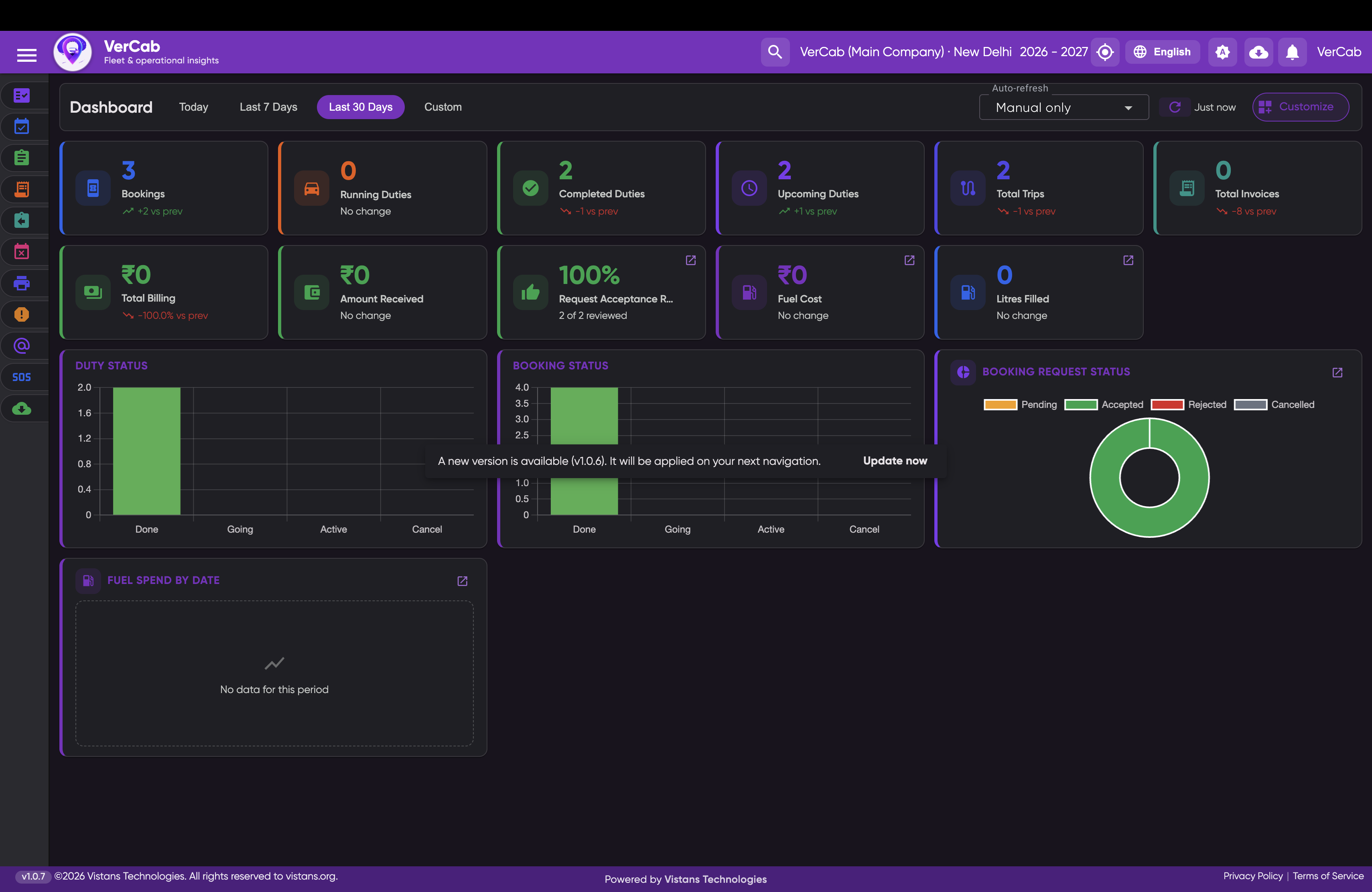
Bookings, duties, trips and billing for the selected period, with operational status charts and fuel spend in one view.
01
Web Portal
Where the operation is planned, dispatched and settled.
- Full GPS fleet tracking
- Smart booking creation
- Automated duty assignments
- Digital duty slips
- Fleet management
- Fuel management
- Inventory management
- Client management
- Vendor management
- HR management
- Attendance
- Payroll
- Financial accounting
- E-invoicing
- Automated alerts
- SMS
- WhatsApp routing
- Analytics dashboards
- Operational reports
02
Mobile App
Where the operation actually happens — in the vehicle, on the move.
- Live GPS broadcasting
- Duty start and end
- Digital attendance
- GPS verification
- Push notifications
- Expense and fuel logs
- Document uploads
- Licence, RC and permit handling
- Navigation integration
- Real-time sync
How the system works
One booking, from request to invoice.
01
Booking created
A booking enters the portal — raised by an operator, a client or a vendor.
02
Driver notified
The duty is assigned and pushed to the driver's app.
03
GPS tracking
The vehicle broadcasts position and route for the length of the duty.
04
Duty completed
The driver closes the duty; the digital duty slip is the record.
05
Invoice generated
The invoice resolves from the duty it came from, not from a spreadsheet.
Roles and access
Who sees what.
The same journey looks different depending on who is asking. Access follows the role.
- Account administrator
- The whole account: users, roles, policy and cost centres.
- Travel manager
- Every request, approval and journey across the organisation.
- HR / Admin
- Employee movement they raise, and its status.
- Department manager
- Their department's requests, approvals and spend.
- Approver
- Requests awaiting their decision, with policy context attached.
- Finance
- Billing, invoices and spend by department and cost centre.
- Executive assistant
- Booking and tracking on behalf of the people they support.
- Employee
- Their own journeys and the vehicle assigned to each.
How it works
From your request to your invoice.
- 01
Users and roles
Your organisation defines who can raise, approve and see what.
- 02
Request
A booking is raised against the corporate account, by anyone entitled to.
- 03
Approval
It routes to the right approver, with policy already applied.
- 04
Assignment
VerCab allocates the vehicle and the chauffeur against the requirement.
- 05
Live journey
Position and route are visible to the desk and to the traveller.
- 06
Completion
The trip closes against the booking it came from.
- 07
Billing
Charges resolve from the trip, not from a re-keyed spreadsheet.
- 08
Invoice
One consolidated invoice per cycle, split the way you account for it.
- 09
Reporting
Usage, spend and utilisation, readable by department and cost centre.
Next step
Tell us how yourorganisation moves.
Volume, cities and policy requirements. We will come back with an account structure and commercials — not a demo.